If your Replit app runs perfectly in the workspace but falls over the moment you actually deploy it, you're not imagining things — the Replit editor environment and the deployment environment genuinely resolve dependencies through different paths. The editor may be using cached packages or globally installed versions that simply aren't available in a fresh deployment build. Here's how to close that gap.
Why "it works in the workspace" isn't proof of anything
Your Replit workspace accumulates state over time — packages installed ad hoc, environment variables set once and forgotten, cached versions that happened to work together. A fresh deployment build doesn't inherit any of that; it resolves dependencies from scratch based on what's actually declared in your project, which can be meaningfully different from what's actually running in your editor session.
The four most common specific causes
1. Dependency version drift
Packages that were installed manually or updated ad hoc in the workspace, but never properly locked in your dependency manifest, can resolve to different versions during deployment. The fix is making sure your lockfile accurately reflects what you're actually running, and that nothing was installed outside of it.
2. Missing secrets/environment variables in the deployment target
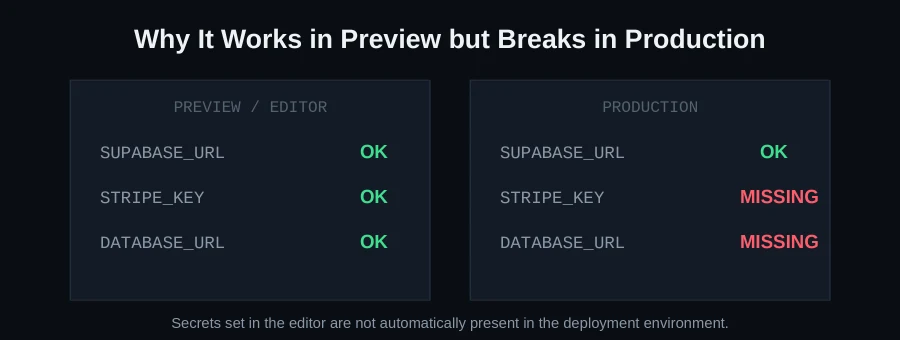
Secrets configured in your Replit workspace don't always carry over automatically to the deployment environment. Anything your app depends on — API keys, database URLs — needs to be explicitly confirmed present in the deployment configuration, not assumed.
3. Port and host binding misconfiguration
A very common, very silent Replit deployment failure: the app binds to localhost or a hardcoded port instead of the host and port the deployment environment actually expects (usually 0.0.0.0 and an environment-provided port variable). The app "starts" from its own perspective and then never becomes reachable.
4. Stale cached packages masking real dependency issues
If the workspace has cached an older or globally-installed version of a package that isn't in your actual manifest, everything looks fine until deployment resolves dependencies fresh and can't find what the workspace was silently relying on.
A practical way to catch this before it costs you a launch
- Confirm your dependency manifest and lockfile are complete and don't rely on anything installed manually outside of them
- List every environment variable/secret your app reads and confirm each is explicitly set in the deployment configuration
- Check your server startup code binds to the host/port the deployment environment expects, not a hardcoded local value
- Where possible, test a deployment to a staging target before pointing your real domain at it
Database and storage connections are a related trap
A database or storage connection that works from the editor's network context sometimes isn't properly wired for the deployed app — another case where "it works here" doesn't transfer. Verify your production database connection explicitly rather than assuming it inherited correctly from workspace configuration.
Logging your way to a faster diagnosis
When a Replit deployment fails and the cause isn't obvious from the platform's own logs, adding explicit startup logging to your own application pays off quickly — a simple log line confirming which environment variables were successfully loaded (never log their actual values, just whether each expected one is present), what port the server bound to, and confirmation the database connection succeeded before accepting requests. This turns "the deployment failed" into "the deployment failed specifically after the database connection step," which narrows the search dramatically compared to treating the whole startup process as a black box.
Treating your Replit deployment secrets as a first-class configuration surface
It's worth periodically auditing your deployment secrets panel the same way you'd audit any other part of your configuration — checking for secrets that are set but no longer used (dead configuration that creates confusion later), confirming naming consistency between what your code expects and what's actually configured, and removing anything left over from earlier experiments that could cause unexpected behavior if accidentally referenced again.
Reading Replit's deployment logs effectively
When a deployment fails, the logs usually tell you which of the four causes above applies — but only if you read past the first line. A dependency resolution failure typically names the specific package it couldn't find or that conflicted; a missing secret usually shows up as an "undefined" or "cannot connect" error at the point your app tries to use it; a port-binding issue shows the app "started" successfully in the logs but the deployment never becomes reachable. Matching the specific symptom to the specific cause saves you from checking all four possibilities every time.
The port-binding issue deserves special attention
This one is worth calling out separately because it's uniquely confusing: your application logs will often show the server successfully starting — no error, no crash — and yet the deployed URL never responds. This happens because the app is listening on a host or port the deployment environment isn't actually routing traffic to. Most deployment platforms, Replit included, expect your server to bind to 0.0.0.0 (not localhost or 127.0.0.1) and to read the port from an environment variable the platform provides, rather than a hardcoded value like 3000. If your app "starts fine" but is unreachable, this is the first thing to check.
A concrete pre-deployment checklist for Replit specifically
- Open your dependency manifest and confirm it lists everything your app actually imports — not relying on anything that happens to be globally available in the workspace
- Cross-reference every secret your code reads against what's configured in Replit's deployment secrets panel specifically, not just the development workspace secrets
- Confirm your server binds to
0.0.0.0and reads its port from the environment, not a hardcoded number - If your app uses a database, verify the connection string used in deployment is explicitly the production one, not one that happens to work because of the editor's network context
- Redeploy and read the full log output, not just the final status
Why this class of bug is so common with AI-built Replit apps specifically
AI-generated code optimizes for "the feature works when I test it," and testing inside the Replit workspace is the natural, fastest way to verify that — which means the code gets validated against the workspace's environment characteristics, not the deployment target's. A human developer who's deployed a few dozen apps develops an instinct to test against something closer to production before calling a feature done; an AI assistant doesn't have that instinct unless the prompt specifically asks for it, and "make sure this works when deployed, not just in the workspace" is a request most people don't think to make until after their first failed deploy.
A deeper look at dependency version drift
This cause deserves more explanation because it's the least visible of the four. Your Replit workspace can accumulate packages that were installed via a quick command, or that got pulled in as a side effect of another package, without ever being explicitly recorded in your project's own dependency manifest. Everything works, because the workspace's actual installed state includes them — but a deployment build only installs what the manifest declares. The result is a deployment that fails to find a module your code imports, even though that exact code worked perfectly seconds ago in the workspace.
The reliable fix is treating your dependency manifest as the single source of truth, not the workspace's current installed state. Periodically run a clean install from the manifest alone (removing the existing installed packages first) and confirm your app still runs — if it doesn't, you've just found exactly what was silently missing from your manifest, before a real deployment found it for you.
Static asset and file storage gotchas
Beyond dependencies and secrets, a related trap: apps that write to or read from the local filesystem (user uploads, generated files, logs) often work fine in a persistent workspace but fail or lose data in a deployment environment where the filesystem may not persist between restarts, or may not be writable at all. If your app depends on local file storage for anything users care about, verify explicitly whether your deployment target's filesystem is persistent, and if it isn't, move that storage to an actual persistent service (object storage, a database) before it costs you real user data.
If you've checked all of this and it's still broken
Some of these issues need someone to actually diff the workspace dependency state against a clean deployment build to find the real discrepancy — not always obvious from the deployment logs alone. This is exactly the kind of problem we resolve on our Replit rescue page. Send your project on WhatsApp for a free scan and we'll tell you exactly what's different between your workspace and your deployment.
FAQ
Why does my database work in the editor but not after deploying?
Usually a connection configured (even accidentally) for the editor's network context rather than explicitly set for the deployment environment. Verify the production connection string is actually present and correct in your deployment config.
Is this a Replit-specific problem?
The specific dependency-resolution gap is particularly common on Replit, but the broader "editor works, deploy doesn't" pattern shows up across browser-first AI builders — see our Bolt.new guide for a closely related pattern.
What host should my server bind to for Replit deployments?
0.0.0.0, reading the port from the environment-provided variable — binding to localhost is the single most common cause of a deployment that "starts" but is never actually reachable.
How do I check what's actually different between my workspace and my deployment?
Compare your dependency manifest and lockfile against what deployment actually installs, and compare your workspace secrets against your deployment secrets panel — these two lists should match exactly, and any discrepancy is a likely cause of the failure.