Windsurf's Cascade agent can make sweeping, autonomous changes across a codebase, which is powerful when it works and disorienting when it stalls mid-task. Because Cascade, chat, and autocomplete all run through the same underlying inference connection, when one AI feature dies, they usually all die together — which is actually a useful diagnostic clue.
Cascade spinning with no response
If the Cascade panel shows a spinner indefinitely with no output, check whether autocomplete and chat have also stopped working at the same time. If they have, the issue is almost certainly the underlying inference connection, not your project — check the provider's status page before troubleshooting your codebase.
A billing-related hiccup is also a known, surprisingly common cause of this exact symptom, and typically resolves within a few minutes once identified and addressed on the account side.
VPN and firewall interference
If your VPN routes through a restrictive exit node, or a company firewall blocks outbound connections to endpoints that aren't explicitly approved, the AI features fail silently — no clear error, they just stop responding. Temporarily disabling your VPN is a fast way to confirm or rule this out.
File access errors in restricted environments
Cascade needs read/write access to your project files to actually apply changes. If your project is opened from a network share, inside a Docker container, or in a path with restricted permissions, file operations can fail even though the AI itself is responding normally — which looks like a different problem than it actually is.
Fix: move the project to a local path with normal read/write permissions before troubleshooting further.
.windsurfrules not being picked up
Windsurf only reads .windsurfrules from the workspace root. If the file is in a subdirectory, misnamed, or added after the current session already started, Cascade won't see it — and will behave as if no project-specific rules exist at all, which can look like inconsistent or "wrong" behavior rather than an obvious configuration miss.
Indexing performance problems
As a project grows, indexing can slow the whole editor down. Adding a .windsurfignore file (same syntax as .gitignore) at your project root, excluding build artifacts and dependency folders, meaningfully improves indexing performance without losing useful context.
What to do after an interrupted Cascade session
The real risk isn't the stall itself — it's an interrupted session leaving multiple files in a half-applied, inconsistent state. Before continuing, diff the full set of changes Cascade made against what the task was actually trying to accomplish, and verify the project builds cleanly, not just that the files "look" changed correctly.
A systematic diagnostic order worth following
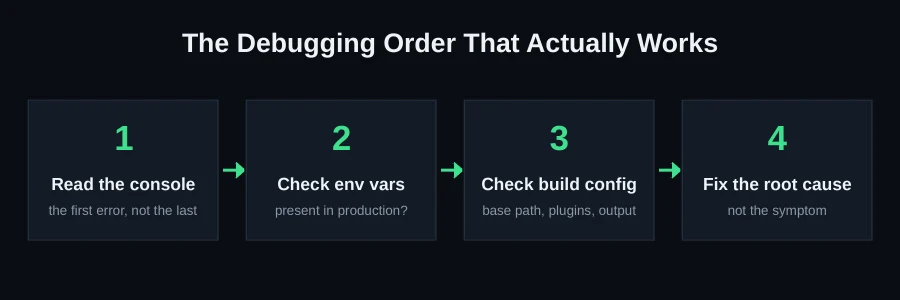
Rather than guessing which of the causes above applies, work through them in this order — it's ordered from fastest to check to slowest:
- Check whether autocomplete and chat are also down. Takes seconds, and immediately tells you whether this is a connection issue or something specific to Cascade.
- Check the provider's status page. If there's a known outage, stop troubleshooting locally — it'll resolve on its own.
- Temporarily disable your VPN if you're on one, and retry.
- Confirm your project isn't opened from a restricted path — a network share, inside a container, or anywhere with unusual permissions.
- Check your
.windsurfruleslocation and content if behavior seems inconsistent rather than fully unresponsive.
Why file-permission issues are especially sneaky
Unlike a connection failure, a file-permission problem doesn't necessarily present as an obvious error — Cascade may respond normally, propose changes, and appear to apply them, while the actual writes silently fail or partially succeed. This is worse than an obvious crash because it can leave you believing a change was made when it wasn't, or when it was only partially made. If you're working from a network-mounted drive, a container, or any environment with non-standard file permissions, and you notice proposed changes that don't seem to be reflected when you check the files directly, this is the first thing to verify.
Working with, not against, Codeium's inference architecture
Because every AI feature in Windsurf shares the same underlying inference connection, there's a practical implication for how you work during a period of degraded connectivity or high load: batching your requests into fewer, more complete asks (rather than many small back-and-forth exchanges) reduces how often you're exposed to a transient failure mid-task. This isn't a permanent workaround for a real outage, but it does reduce how often minor connection hiccups interrupt a task that was almost done.
Recovering cleanly from an interrupted Cascade session
The practical recovery process, in order: first, check your git status to see the full list of files Cascade touched, even ones you didn't expect. Second, review each changed file against what the original task was trying to accomplish — not just skimming, since an interrupted session can leave a change that's syntactically valid but logically incomplete. Third, run your build/test process before assuming anything is safe to keep. Fourth, commit only once you've confirmed the state is actually coherent, rather than committing immediately just to "save" an uncertain state.
Why Cascade's autonomy is a double-edged strength
It's worth being explicit about the trade-off Windsurf is making by default: Cascade's ability to make sweeping, multi-file, autonomous changes is precisely what makes it fast for large refactors, and precisely what makes an interruption more consequential than it would be in a tool that only edits one file at a time. There's no free lunch here — the same autonomy that lets you say "restructure this module" and have it actually happen across a dozen files is the reason a stall mid-task can leave a dozen files in an uncertain state instead of just one. Understanding this trade-off is what should drive how cautiously you treat large, autonomous requests versus small, contained ones — reserve the biggest asks for moments when you can actually watch the session through to completion and review the result immediately, rather than starting a large Cascade task and walking away.
Windsurf-specific configuration worth setting up once
Beyond .windsurfrules and .windsurfignore, it's worth deliberately defining what Cascade should never touch without explicit confirmation — deployment configuration, environment files, and anything related to production credentials are reasonable candidates. Being explicit about these boundaries up front reduces the chance that an ambitious, autonomous change accidentally reaches into territory that should require a human decision, regardless of whether the session completes cleanly or gets interrupted.
Distinguishing a genuine bug from a one-off connectivity blip
Not every stall is worth deep troubleshooting — transient network hiccups happen, and the practical question is how long to wait before escalating from "probably temporary" to "actually investigate." A reasonable rule of thumb: if a single feature (say, just Cascade) is unresponsive for under a minute, it's very likely transient. If it persists past a few minutes, or if multiple AI features are down simultaneously, that's the threshold where checking the provider's status page and working through the diagnostic order above is worth the time, rather than continuing to wait.
Comparing Windsurf's failure patterns to other AI IDEs
It's worth noting that the "everything shares one inference connection" architecture isn't unique to Windsurf — most AI-integrated IDEs and editors route their various AI features (completion, chat, agentic edits) through a single underlying service, which means the same diagnostic logic (check if multiple features died together) is broadly transferable if you also use tools like Cursor or GitHub Copilot. What is more specific to Windsurf is Cascade's degree of autonomy in making multi-file changes without a step-by-step confirmation for each file — closer to Claude Code's agentic model than to a traditional inline-suggestion tool like Copilot, which is why the recovery advice in this guide leans more on "audit the full diff" than "review each suggestion as it appears."
Bringing a stalled project back from a genuinely bad state
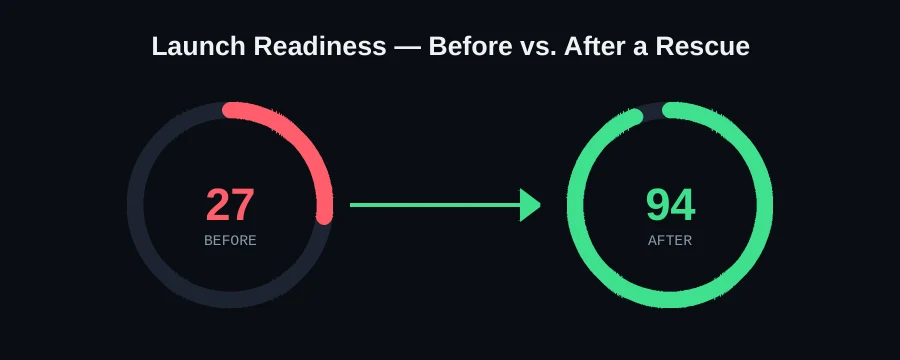
Occasionally, a project accumulates enough interrupted sessions and inconsistent partial changes that it's no longer just "one thing to fix" — it needs an actual audit. In that situation, the useful first step isn't more Cascade sessions; it's stepping back and cataloguing what state the project is actually in: what builds, what doesn't, which features work end to end, and which only appear to. That inventory is what turns a vague "it's a mess" into an actionable list, and it's exactly the starting point we use on every rescue, regardless of which AI tool built the project originally.
When it's genuinely broken, not just stuck
If you've worked through connection, permissions, and configuration and the project is still in a bad state, that's a job for someone who can audit the actual file diff rather than restart and hope. This is exactly what we do on our Windsurf rescue page — send your project on WhatsApp for a free scan.
FAQ
How do I know if it's a Windsurf/connection issue vs. my code?
If autocomplete, chat, and Cascade all stop responding at once, it's almost certainly the connection, not your project — check the provider's status page first.
Can an interrupted Cascade session break my project permanently?
Not permanently, but it can leave files inconsistent. Commit your work incrementally during large Cascade sessions so you always have a clean rollback point.
Why would Cascade say it made a change that isn't actually there?
This usually points to a file-permission issue — Cascade proposed and believed it applied a change, but the actual write silently failed or only partially succeeded. Check your project's file permissions, especially if it's on a network share or inside a container.
Does a .windsurfignore file affect what Cascade can edit, or just indexing?
Just indexing performance — it controls what gets scanned for context, not what Cascade is allowed to modify.