v0 generates polished Next.js UI quickly, which makes it a great prototyping tool — and also means chat-based iteration can spiral fast when something goes wrong, with each attempted fix sometimes introducing a new problem instead of resolving the original one. Separately, a deployed v0 app can look broken even when a version that worked yesterday hasn't technically changed. These are two different problems with two different fixes.
Problem 1: the chat gets stuck in a repeating error loop
This is a widely reported pattern — an error appears, you ask v0 to fix it, the fix introduces a related error, and the cycle continues without actually converging. Forking the chat to try a different approach sometimes works the first time and then stops helping on subsequent attempts.
Fix: stop iterating inside the chat loop. Export or copy the current code, and fix the specific bug directly rather than continuing to prompt around it — a loop is a sign the conversational context itself has become part of the problem, not just the code.
Problem 2: a deployed app looks broken even though a past version worked
This one is more confusing because nothing about your code necessarily changed — but the platform, a dependency, or an environment setting did. Before assuming your code is at fault, diff what's actually different between the working deployment and the current one: dependency versions, environment variables, and platform-level configuration are the usual suspects, not application logic.
The most common specific root causes
1. OAuth (Google/GitHub) authentication failures
Login working locally but failing after deployment is very often a redirect URI mismatch — your OAuth provider configuration needs to explicitly know about your actual production domain, not just localhost. This is one of the most frequently reported v0 deployment issues.
2. Broken dynamic routes or missing metadata in Next.js
Route handlers and metadata generation that work in the v0 preview can behave differently once deployed, particularly around dynamic route segments and page metadata used for social sharing.
3. CORS errors calling your API from the deployed domain
If requests fail specifically with a CORS error (visible in the browser console), the fix is allowed-origin configuration on your API, not your frontend code.
4. Favicon, meta tag, and static asset path issues
Smaller, but reported often enough to be worth checking: static assets referenced with paths that worked in preview but resolve incorrectly once deployed under a different base path or domain.
A practical debugging order
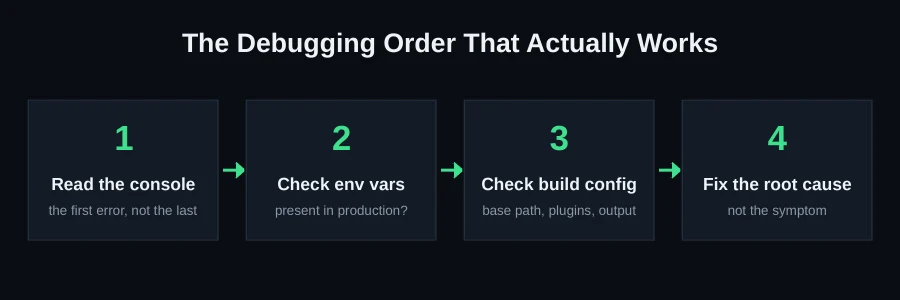
- Open the browser console on the broken deployment and read the actual error — don't guess
- If it's an auth failure, check your OAuth provider's redirect URI configuration against your real production domain first
- If it's a CORS error, fix allowed-origin configuration on the API side
- If nothing obviously changed, diff dependency versions and environment variables between the last known-working deploy and now
Why the error loop happens in the first place
Each message in a chat-based coding session adds context, but it also adds potential for confusion — especially once an error and several attempted fixes are all part of the same conversation history. The model is now reasoning about your original request, the bug, and multiple prior (partially wrong) fix attempts simultaneously, which increases the odds that the next suggestion addresses the symptom of the last attempt rather than the original root cause. This compounds with each iteration, which is exactly why "fork the chat and try again" sometimes helps once — it clears the confused context — and stops helping on later attempts, because the same compounding starts over.
A more reliable way to break a persistent loop
Once you've noticed you're in a loop (the same category of error recurring after two or more "fixes"), the most reliable move is to stop treating it as a chat problem and start treating it as a code problem: export the current state, open it in a real editor, and read the actual error and the specific line it references yourself, or with a tool built for reading code rather than iterating on it conversationally. This isn't a failure of v0 — it's recognizing that conversational iteration and direct debugging are different tools suited to different situations, and a persistent loop is a signal to switch tools.
The deployment-drift problem, explained more concretely
"It worked yesterday and doesn't today, and I didn't change anything" is disorienting precisely because it violates the usual assumption that behavior is a function of your code. In a deployed app, it's also a function of the platform, your dependencies' latest resolved versions (if you're not pinning them), and any environment configuration — all of which can change independently of your commits. When this happens, resist the urge to start changing application code to "fix" a problem that isn't actually in your application code. Diff the environment first.
A practical way to diff "what changed" when nothing obviously did
- Check your dependency lockfile's timestamp and compare against when the deployment last succeeded — an unpinned dependency update is a common silent cause
- Check your hosting platform's changelog or status page for the relevant date range
- Compare your environment variable configuration against what it was during the last known-good deploy, if your platform keeps a history
- Only once the above are ruled out, start looking at your actual application code for the specific error
OAuth failures deserve one more concrete note
Because this is one of the most frequently reported v0 deployment issues, it's worth being explicit: OAuth providers (Google, GitHub, etc.) require you to register the exact redirect URI your app will use, and this has to include your real production domain — not just localhost, and not just the preview URL v0 gave you during development. If login works locally but fails after you point a custom domain at your deployment, check your OAuth provider's allowed redirect URIs first, before assuming anything is wrong with your authentication code itself.
Next.js-specific routing and metadata quirks worth knowing
Because v0 generates Next.js projects specifically, a few framework-level quirks are worth understanding rather than treating as mysterious bugs. Dynamic route segments (folders like [id]) that work in preview can behave differently once deployed if the deployment platform's routing configuration doesn't match what your framework version expects — this is more common after a framework version bump than most people expect. Metadata generation (the code responsible for page titles and social-sharing previews) runs at build or request time depending on how it's configured, and a page that shows the right title in preview but a generic one once deployed usually means the metadata function is depending on data that isn't available in the deployment's execution context the same way it was in preview.
A broader point about "chat-built" apps and technical debt
It's worth naming directly: apps built entirely through conversational iteration can accumulate a specific kind of technical debt that's invisible until you try to change something — components that duplicate logic because each was generated somewhat independently, inconsistent patterns for handling loading and error states across different pages, and styling approaches that drifted as the conversation moved from one feature to the next. None of this is necessarily "wrong," but it does mean that as a v0 project grows past an initial prototype, a periodic consolidation pass (even a light one) pays off — much the same way a hand-built codebase benefits from periodic refactoring, just for slightly different underlying reasons.
A practical habit: exporting and version-controlling early
Because v0's chat interface is so easy to iterate in, it's tempting to treat the chat itself as your source of truth and only export when you think you're done. A better habit is exporting to a real git repository early, even before the project feels finished, and committing after each meaningful chat-driven change. This gives you the same safety net that protects any other AI-assisted workflow: a clear diff of what actually changed, and a rollback point if a subsequent change makes things worse instead of better. It also makes the "diff the environment, not your code" debugging approach described above actually possible — you need a real commit history to compare against.
Checking your app in a genuinely clean environment
Before trusting that a deployment issue is fully resolved, test it somewhere with no leftover state — a private/incognito browser window, or ideally a different device entirely. Cached service workers, stale cookies, and browser-level caching of your previous (broken) deployment can all make a fix look like it didn't work when it actually did, or mask a fix that only partially worked. This single step eliminates an entire category of false debugging leads.
When the loop won't break on its own
Sometimes the underlying bug is subtle enough that continuing to prompt v0 genuinely won't resolve it — it needs someone to read the actual code and stack trace. This is exactly the kind of problem we resolve on our v0 rescue page. Send your project on WhatsApp for a free scan and a scored report of what's actually wrong.
FAQ
Should I keep asking v0 to fix an error that keeps coming back?
After two attempts without convergence, no — export the code and fix it directly, or bring in someone who can read the actual stack trace instead of iterating blind in chat.
Why did my app break without me changing anything?
Platform-level changes (dependency updates, environment configuration) can affect a deployment even when your application code is untouched — always diff the environment, not just your commits.
Does forking the chat actually help?
Sometimes, once — it clears confused conversational context that was compounding the loop. It's not a reliable repeated strategy, because the same compounding tends to recur.
What's the first thing to check for an OAuth login failure after deploying?
Your OAuth provider's registered redirect URIs — confirm your actual production domain is listed, not just localhost or the preview URL.