
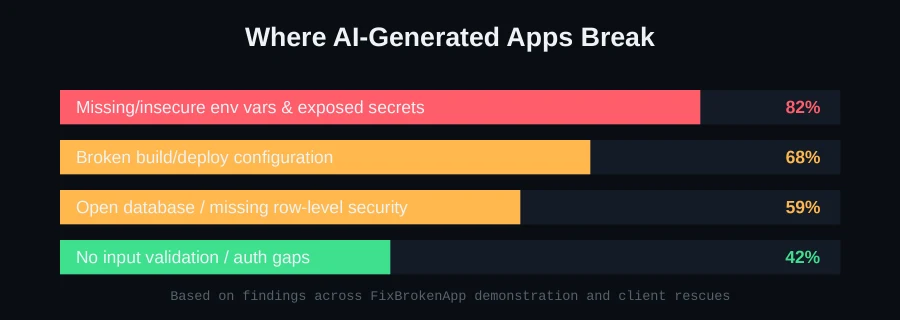
GitHub Copilot writes fast, fluent, plausible-looking code — and that fluency is exactly why its security gaps are easy to miss. This isn't speculation: empirical research analyzing real Copilot-generated code found security weaknesses in roughly 29.5% of Python snippets and 24.2% of JavaScript snippets, spanning dozens of distinct vulnerability categories. If Copilot is part of your workflow, here's precisely what's worth auditing.
Why fluent code isn't the same as secure code
Copilot is trained to produce code that looks like what a competent developer would write — syntactically correct, following common patterns, doing roughly what you asked. It's not evaluating whether that pattern is safe in your specific context. A default configuration that's fine for a tutorial can be a real vulnerability in a production app handling real user data.
The vulnerability categories that show up most
1. Partial authorization
The most commonly cited issue: code that correctly checks whether a user is authenticated, but not what they're allowed to do. A logged-in user being able to access another user's data by changing an ID in a URL is a textbook example — the endpoint checks "are you logged in," not "do you own this resource."
What to check: every endpoint that accepts an ID (user ID, order ID, document ID) should verify the authenticated user actually owns or has permission to access that specific resource — not just that they're logged in at all.
2. Injection vulnerabilities (XSS, SQL injection, CSRF)
The vast majority of newly introduced security weaknesses in Copilot-assisted code fall into cross-site scripting, SQL injection, and cross-site request forgery — the OWASP classics, still showing up because AI-suggested code sometimes reaches for string concatenation or unescaped output over the safer, slightly more verbose pattern.
What to check: every database query uses parameterized queries or an ORM, never raw string concatenation with user input. Every place user input is rendered back into HTML is properly escaped. State-changing requests (POST/PUT/DELETE) require CSRF protection.
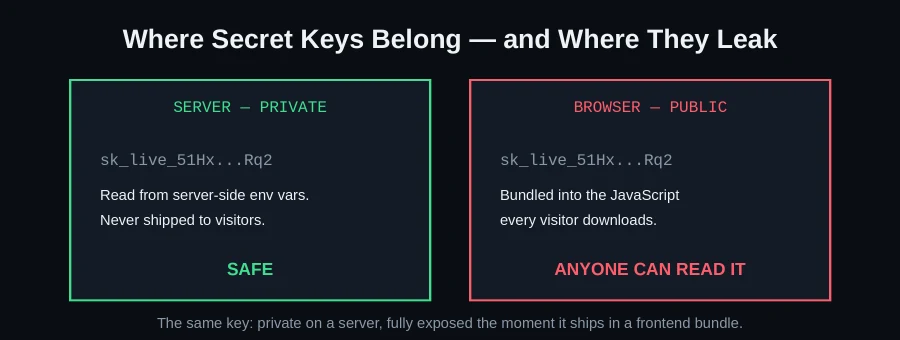
3. Hardcoded credentials and secrets
Research has found that repositories using Copilot leak meaningfully more secrets than typical public repositories — a pattern consistent with AI suggestions sometimes reaching for a literal example value that a developer copies through without replacing.
What to check: search your codebase for anything that looks like a real key, token, or password rather than a config reference, and set up automated secret-scanning (many git hosts offer this natively) to catch it going forward.
4. Insecure default configurations
Default configurations in AI-suggested code often lack production hardening — permissive CORS settings, verbose error messages that leak stack traces, session handling without proper flags. These are exactly the kind of "works fine in a demo, risky in production" defaults that don't announce themselves as problems.
A practical Copilot-era review checklist
- Every endpoint accepting a resource ID checks ownership/permission, not just authentication
- Every database query is parameterized — no raw string concatenation with user input
- Every place user input reaches HTML output is properly escaped
- No literal secrets, keys, or credentials anywhere in committed code
- CORS, session, and error-verbosity settings are explicitly reviewed for production, not left at defaults
Copilot Chat itself can help find some of these issues when asked directly — but shouldn't be relied on as a comprehensive security review; secure adoption realistically requires actual review practices and tooling alongside the AI assistance, not instead of it.
Why volume makes this worse, not just the error rate itself
A ~25-30% weakness rate sounds almost manageable in isolation, until you factor in how much code Copilot actually generates in a typical workflow — accepted suggestions across an entire team, every day, compounding over the life of a project. Even a well-intentioned team doing normal code review can develop suggestion fatigue: when most Copilot suggestions are reasonable, reviewers naturally start skimming rather than scrutinizing, which is exactly when the smaller percentage that's actually flawed slips through unnoticed.
How prompt injection through configuration files works
One of the more subtle risks worth understanding: Copilot and similar tools can read project configuration and documentation files as context, and in some documented cases, carefully crafted content in those files has been used to influence what the AI subsequently suggests — a form of prompt injection that doesn't require any direct access to your development environment, just the ability to get malicious content into a file the AI reads for context (a pull request description, a README, a config file). This is a newer and less widely understood risk category than the classic OWASP ones, and worth being aware of specifically if your project accepts external contributions.
A more detailed walkthrough of the authorization gap
Partial authorization deserves a concrete example because it's easy to miss in review. Imagine an endpoint like GET /api/orders/:id that checks if (!user) return 401 and then fetches and returns the order matching that ID. This passes a casual review — there's clearly an auth check. But it never verifies that order.userId === user.id. Any logged-in user can view any order by simply changing the ID in the URL. This exact shape of bug — authenticated but not authorized — is what the research flags as one of the most common Copilot-introduced weaknesses, precisely because the code looks secure at a glance.
Building a review habit specifically for AI-suggested code
Rather than trying to review every line with equal scrutiny (which isn't sustainable), it's more effective to apply extra scrutiny specifically to categories where AI-generated code is statistically more likely to have issues:
- Any endpoint or function that accepts an identifier and fetches a specific resource — check ownership, not just authentication
- Any code that builds a query, command, or HTML string from user input — check for parameterization and escaping
- Any configuration block (CORS, sessions, cookies, error handling) — check it against your actual production requirements, not the tutorial-friendly default
- Any credential, key, or token that appears as a literal value rather than a reference to configuration — treat as a leak until proven otherwise
Tooling that helps beyond manual review
Manual review alone doesn't scale indefinitely, and it's worth pairing with automated tooling: static analysis (tools like Semgrep can be configured with rules specifically targeting these patterns), automated secret-scanning on every commit, and dependency vulnerability scanning as a routine CI step rather than an occasional manual check. None of these replace human review, but they catch the mechanical, pattern-matchable subset of these issues consistently, which frees up review attention for the genuinely judgment-requiring cases.
The XSS and SQL injection patterns worth knowing by sight
It's worth being able to recognize these specific patterns at a glance, since they're what the research flags as the majority of newly introduced weaknesses. For SQL injection, the red flag is any query built through string concatenation or interpolation that includes a variable derived from user input — "SELECT * FROM users WHERE email = '" + userInput + "'" is the canonical dangerous shape, regardless of language. The safe alternative is always a parameterized query or an ORM method that handles escaping for you. For XSS, the red flag is user-supplied content being inserted into HTML output without escaping — particularly common in templating contexts where a "raw" or "unescaped" output mode exists and gets reached for because it's convenient for rendering intentional HTML, then reused carelessly for user content that should never be trusted as safe HTML.
Why session and cookie configuration matters more than it seems
Default session and cookie settings in AI-suggested authentication code often skip flags that matter in production: httpOnly (preventing client-side JavaScript from reading the session cookie, which blocks a common XSS-to-session-theft escalation), secure (ensuring the cookie is only sent over HTTPS), and appropriate expiration. None of these are exotic — they're standard practice — but a tutorial-derived default frequently omits them because they're not necessary to make a demo "work," only to make it safe.
Getting an actual audit done
If you'd rather have a real security pass than work through this checklist manually, this is exactly what our Launch Readiness scan checks for, and exactly what we fix on our GitHub Copilot rescue page — secrets, injection surfaces, authorization gaps, and insecure defaults, scored and prioritized. Send us your repo on WhatsApp for a free scan.
FAQ
Does this mean I shouldn't use Copilot?
No — it means treat its output the way you'd treat code from a fast, prolific, but unreviewed contributor: useful, but worth a real security pass before it reaches production, especially around auth, secrets, and user input.
Is this worse than hand-written code?
The research specifically measured Copilot-assisted code against these categories — it's not necessarily that AI code is categorically worse, but that its speed and volume make it easy to skip the review step that would normally catch these patterns.
What's the single highest-value check if I only have time for one?
Authorization on any endpoint that accepts a resource ID — it's the most commonly cited gap, it's not caught by basic testing (the happy path works fine), and it directly exposes other users' data when missed.
Can automated tools catch all of these issues?
No — they catch the mechanical, pattern-matchable subset (known secret formats, common injection patterns) reliably, but authorization logic specifically requires understanding your application's actual data model, which is still a human review task.