Cursor is, by most accounts, the strongest AI code editor for serious refactors and large, context-aware changes — which is exactly why Cursor projects tend to be more ambitious, and why the gap between "working in the editor" and "working in production" tends to be wider than with simpler app builders. Below are the pitfalls we see most often when a Cursor-built project is actually pushed toward launch.
1. Stuck sessions and unresolved half-finished edits
The most commonly reported Cursor issue isn't really a code bug at all — it's the chat interface itself getting stuck, showing loading dots that never resolve. When that happens mid-refactor, it can leave a codebase in an inconsistent state: some files updated to a new pattern, others still on the old one. If you didn't carefully review the diff before the session died, you may be shipping half of a change.
Fix: before trusting any large Cursor-driven refactor, diff the full change set against the previous working state and verify every file that should have changed actually did — not just the ones you happened to look at.
2. Oversized codebase index degrading performance and accuracy
As a Cursor project grows, an oversized index (plus too many background extensions competing for resources) is a common cause of both editor slowdowns and lower-quality AI suggestions. This isn't just an annoyance — a degraded index means the AI has less accurate context about your actual codebase, which increases the odds of it reintroducing a bug it already "fixed" elsewhere, or duplicating logic that already exists.
Fix: exclude build artifacts, dependency folders, and generated files from indexing, and periodically clear and rebuild the index rather than letting it grow indefinitely.
3. Silent regressions from large, unreviewed diffs
Cursor's biggest strength — making sweeping, multi-file changes in one request — is also the biggest production risk if those changes aren't reviewed carefully. A large diff that "looks right" can still quietly break an edge case that wasn't covered by manual testing, especially around authentication, payment webhooks, or anything stateful.
Fix: treat large AI-generated diffs the way you'd treat a large PR from an unfamiliar contributor — read it fully, and specifically test the parts of the app the diff touched that aren't obviously related to the feature you asked for.
4. Connection and authentication errors that look like code bugs
A generic "connection error" or "request failed" badge in Cursor is very often not a bug in your project at all — it's a stale or expired auth token on Cursor's side. Because the symptom looks identical to a real backend error, teams sometimes spend hours debugging their own API integration when the actual fix is signing out and back into Cursor.
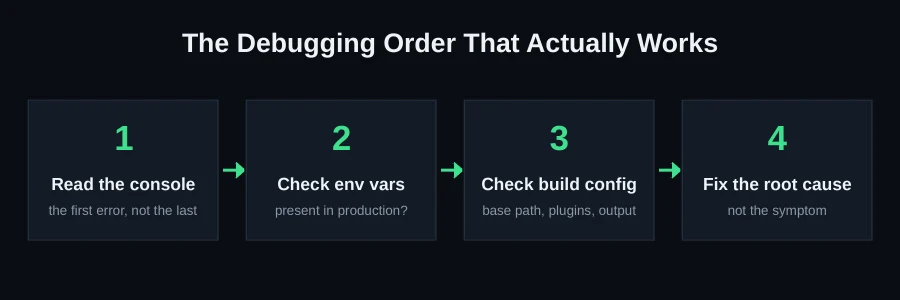
Fix: when you hit an unexplained connection error, rule out Cursor's own auth state first (sign out, sign back in, restart) before assuming it's your application code.
5. No real deployment testing before launch
Cursor projects are usually run and tested locally, in an environment that's more forgiving than most production hosts — different Node version, different environment variable handling, sometimes different filesystem case-sensitivity (macOS is case-insensitive by default; most Linux deploy targets are not). A project that "just works" locally can fail on a fresh production build for reasons that never show up in the editor.
Fix: run an actual production build (npm run build or equivalent) locally before deploying, and deploy to a staging environment that matches production as closely as possible before going live.
6. Treating Cursor's suggestions as finished rather than a starting point
Because Cursor's output is often syntactically clean and immediately runnable, it's tempting to accept a large suggested change wholesale and move on. The risk isn't that the code doesn't run — it's that "runs without error" and "correctly handles every case your users will hit" are different bars. Auth flows, payment webhooks, and anything involving concurrent access (two users booking the same slot, two requests updating the same record) are exactly the areas where "it ran in my test" and "it's actually correct" diverge, because these cases rarely show up in a quick manual click-through.
Fix: for any change touching auth, payments, or shared state, write down (even informally) the two or three edge cases that would actually matter in production, and test those specifically — don't rely on the happy path looking fine as proof the change is safe.
7. Dependency and version drift across a long project history
Long-running Cursor projects that have been through many rounds of AI-assisted changes sometimes accumulate dependency versions that were each individually reasonable at the time but are no longer mutually compatible, or duplicate packages that solve the same problem in two different ways because a later session didn't know an earlier one had already solved it. This kind of drift doesn't usually cause an obvious error — it shows up as flaky, hard-to-reproduce bugs.
Fix: periodically audit your dependency tree for duplicates and check for packages that were added but are no longer actually used anywhere in the codebase.
Why review discipline matters more as project size grows
Every one of these pitfalls gets worse, not better, as a codebase grows. A stuck session on a 500-line project is annoying; a stuck session on a 15,000-line project can leave dozens of files in an ambiguous state that's genuinely hard to fully audit by eye. The practical implication is that the review habits worth building early — diffing full change sets, testing edge cases deliberately, running the real production build before trusting a change — matter more, not less, the further along your project gets. Teams that skip this early because "it's a small project" often find the debt catches up right when they're trying to actually launch.
A closer look at what "reviewing a large diff" should actually mean
"Review the diff" is easy advice to give and hard to do well in practice, especially on a change spanning fifteen or twenty files. A more structured approach: first pass, read every changed file's name and ask whether you expected it to change at all — an AI-generated refactor touching a file you didn't expect is worth understanding before you accept it. Second pass, for files central to the actual feature you asked for, read the logic in detail. Third pass, for files that changed only incidentally (formatting, minor import adjustments), a lighter skim is reasonable. This tiered approach gets you real coverage without requiring the same depth of attention on every single line, which isn't realistic for a large change.
Setting up guardrails so mistakes are caught automatically
Beyond manual review discipline, a few structural habits meaningfully reduce risk on Cursor-driven projects specifically: keep a real test suite, even a modest one, that runs automatically before you consider a change "done" — this catches regressions a visual click-through would miss. Use TypeScript (or an equivalent type system for your language) in strict mode, since AI-generated code that violates type contracts is a fast, mechanical way to catch entire categories of mistakes without manual review at all. And configure your CI to run a real production build on every push, not just locally when you remember to — this closes the exact gap that lets a broken production build slip through unnoticed until deployment.
When it's time to bring in a second pair of eyes
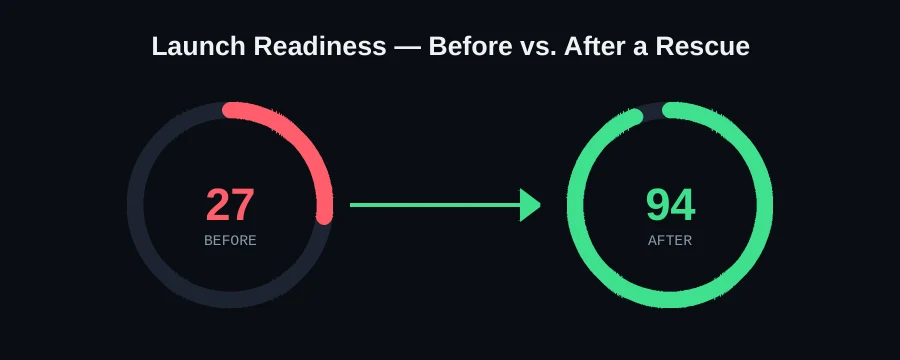
We picked up exactly this pattern in a real Cursor-built SaaS dashboard rescue — a project that worked perfectly in the editor but had database keys exposed to every visitor and a production build that silently failed. We locked down row-level security policies table by table, moved the remaining secrets server-side, and repaired the production build configuration. We took it from a Launch Readiness score of 27 to 94 in 41 hours. If your Cursor project is in a similar spot, our dedicated Cursor rescue page covers exactly how we diagnose and fix these issues, or you can send it to us on WhatsApp for a free scan — we'll tell you your actual Launch Readiness score before you pay for anything.
FAQ
Does Cursor cause more bugs than other AI tools?
Not inherently — Cursor tends to be used for larger, more ambitious refactors than browser-first builders like Lovable or Bolt, so the failure modes are often about scale and review discipline rather than the tool itself being less reliable.
How do I know if a Cursor session left my project in a broken state?
Run your full test suite (or, at minimum, your production build) immediately after any large session, especially one that was interrupted or got stuck. Don't assume a stuck session means "nothing changed" — it usually means "something changed and wasn't finished."
Should I review every single Cursor suggestion line by line?
For small, contained changes, no — that would defeat the point of using an AI editor. For anything touching authentication, payments, database access rules, or shared/concurrent state, yes: those are exactly the categories where a subtle mistake doesn't show up in casual testing but matters enormously in production.
What's the fastest way to check if my Cursor project is production-ready?
Run an actual production build locally, then run a security-focused scan for exposed secrets, open database rules, and missing auth checks — the same checks our free Launch Readiness scan runs automatically.