Claude Code is built for agentic, multi-file work — genuinely useful for large changes, but that same autonomy means a session that goes wrong can go wrong across many files at once, or simply stop making progress on a request that's too big and vague to converge on its own. Here's what's actually happening in the most common failure modes, and what to do about each.
"It can't see my files" or opens an empty project
Claude Code works inside whichever project folder it was opened in — if it seems to have no context of your actual app, the near-universal cause is that it's pointed at the wrong place: an empty folder, a parent directory above your actual project, or a subdirectory that doesn't contain what you think it does.
Fix: close the session and reopen Claude Code specifically inside the folder that contains your project's real entry point (package.json, etc.) — not a directory above or beside it.
Stuck in a loop, repeating the same fix
When a session keeps attempting the same change without resolving it, the underlying issue is almost always scope: the request was too large or too vague for the model to converge on in one pass. Big, ambiguous asks compound uncertainty with every file touched.
Fix: stop the session, and break the task into smaller, concrete requests. For genuinely large changes, use plan mode first so the approach is agreed before code changes start. If a session has already gotten long and unproductive, starting a fresh session with a narrower request is usually faster than trying to rescue the existing one.
"Login successful" immediately followed by "Not logged in"
This specific sequence is a known auth-state issue, not a sign anything is wrong with your project. It's frequently caused by corporate networks or VPNs blocking the OAuth callback that completes the login.
Fix: run /logout, fully quit Claude Code, relaunch, and log in again — off any VPN if you're on one. If it's a browser issue, confirm the login page fully finished loading before it redirected.
Installed but the command isn't found in a new terminal
PATH changes made during installation only take effect in terminal windows opened after the install completed — an already-open terminal won't pick up the change.
Fix: close every open terminal window and start a fresh one before troubleshooting further.
Diagnostic commands worth running before anything else
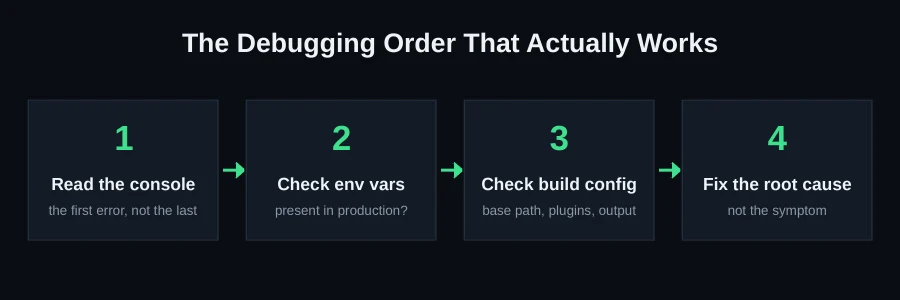
Claude Code ships with a built-in /doctor command that flags common configuration problems directly — invalid settings files and miswired MCP servers are frequent, silent causes of tool access breaking. Run this first before assuming a problem is in your code rather than your setup.
Memory and resource issues
Claude Code needs roughly 4 GB of available RAM to run reliably. On constrained environments (small VMs, low-memory containers), add swap space or move to a larger instance rather than troubleshooting mysterious slowness or crashes as if they were code bugs.
Getting the most out of plan mode
For any change that touches more than a couple of files, plan mode is the single highest-leverage habit for avoiding stuck sessions in the first place. Instead of letting the agent start editing immediately, it proposes an approach first — which gives you a chance to catch a misunderstanding of the task before it turns into a dozen files of changes built on a wrong assumption. Teams that skip plan mode "to save time" on big changes frequently lose more time than they saved, debugging a large diff built on a premise that was wrong from the start.
Committing incrementally: the single best insurance policy
The projects that recover most easily from a stuck or interrupted session are the ones with frequent, small commits leading up to the problem. If a session goes sideways, you can look at exactly what changed since the last known-good commit, rather than trying to reconstruct which of dozens of file changes across a long uncommitted session were actually intentional. If you're running long agentic sessions without committing in between meaningful steps, this is the habit most worth building — it costs seconds and saves hours.
Reading the actual error instead of restarting blind
When something goes wrong, the instinct is often to just restart the session and try again, hoping it goes better the second time. This works sometimes, but it also means you never learn what actually happened — and the same underlying issue (a misconfigured MCP server, a project opened from the wrong directory, a request that was fundamentally too broad) will just recur. Before restarting, it's worth spending thirty seconds running /doctor and reading whatever the last few messages in the session actually said, rather than immediately writing it off as "Claude Code being flaky."
When a project has been through many stalled sessions
Projects that have accumulated several interrupted or stuck sessions over time tend to develop a specific kind of mess: inconsistent patterns across the codebase, because different sessions solved similar problems in different ways without full context of what earlier sessions had already done. This isn't something a single new session can cleanly fix — it usually needs someone to actually read through the codebase, identify the inconsistencies, and consolidate deliberately, which is a fundamentally different task than "write this new feature."
Scoping requests so Claude Code can actually finish them
The line between "a request Claude Code handles cleanly" and "a request that spirals into a stuck loop" usually comes down to how concretely the task is specified. "Add user authentication" is the kind of request that invites a loop — it's underspecified across dozens of decisions (which auth method, session handling, what happens on failed login, password requirements). "Add email/password authentication using the existing User model, with sessions stored in the database, redirecting to /dashboard on success and showing an inline error on failure" gives the model a concrete target it can actually verify itself against. The extra thirty seconds spent being specific up front is reliably faster than debugging a stuck or half-finished attempt at the vague version.
A note on multi-file consistency specifically
One class of bug worth watching for even in successful sessions: Claude Code making a change in one file that has an unstated dependency in another file it didn't touch — an API response shape changed in a backend route, but a frontend component still expects the old shape, because the request didn't explicitly mention that component needed updating too. This isn't unique to Claude Code, but agentic tools that can touch many files increase the surface area where this can happen. After any session that changes a shared interface (an API contract, a shared type, a database schema), it's worth explicitly checking every consumer of that interface, not just the file that was the direct target of the request.
Using CLAUDE.md to reduce repeated mistakes
A project-level CLAUDE.md file, read automatically at the start of a session, is one of the most underused tools for reducing the frequency of the problems above. Documenting project-specific conventions — where things live, what patterns to follow, what's explicitly off-limits without confirmation — gives every future session the context that would otherwise have to be re-explained or, worse, silently guessed at. Projects that invest a few minutes in a clear, specific CLAUDE.md tend to see noticeably fewer sessions that go sideways from a basic misunderstanding of project structure or conventions, because that misunderstanding is exactly what the file exists to prevent.
When to bring in a human reviewer versus trusting the session
Not every Claude Code session needs the same level of scrutiny. Small, well-scoped, easily reversible changes are reasonable to trust with a light review. Changes to authentication, payment handling, database schema, or anything touching production configuration warrant a full human review regardless of how confident the session output looks — these are exactly the categories where a subtle mistake is both hard to notice casually and expensive if it reaches production undetected.
What we do differently when we pick up a stuck project
When we take over a Claude Code project that stalled mid-session, the first thing we do is diff the actual file state against what the last coherent request was trying to accomplish — not restart from scratch, and not blindly continue the loop. We finish what was left half-applied, resolve any inconsistent patterns left behind by multiple stalled attempts, verify the project builds cleanly in a fresh environment (not just the one the session was run in), and hand back a plain-English summary of what changed and why. See our Claude Code rescue page for the full process, or send us your project on WhatsApp for a free scan — we'll tell you exactly what state your project is actually in before you pay for anything.
FAQ
Should I just keep retrying the same prompt?
Generally no — if a request hasn't converged after one or two attempts, the request itself is usually the problem. Narrowing scope is more reliable than repeating the same broad ask.
Can a stuck Claude Code session corrupt my project?
It can leave files in an inconsistent half-changed state, which is different from corruption — your version control history (if you're committing regularly) is the safety net. If you're not committing incrementally during large AI-driven sessions, start now.
Is plan mode worth using for small changes too?
Not necessarily — it adds a step that's genuinely unnecessary for small, well-defined requests. It earns its keep specifically on changes that touch multiple files or have any ambiguity in scope.
How often should I commit during a long agentic session?
Whenever you reach a coherent, working checkpoint — not necessarily after every single file change, but often enough that if the next step goes wrong, you're not losing more than a few minutes of work by rolling back.