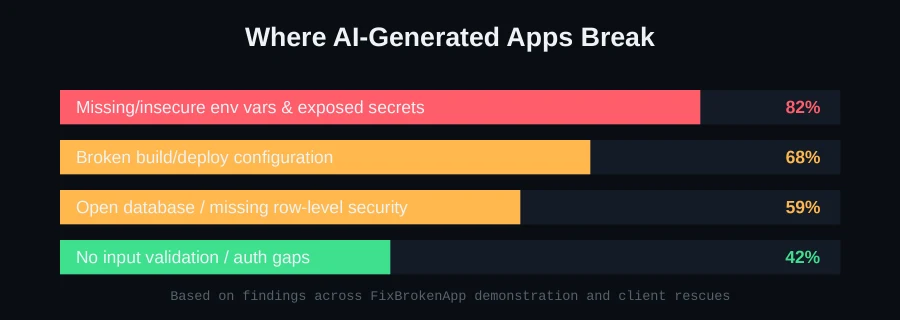
If you built your app with Cursor, Lovable, Bolt, Replit, or v0, there's a good chance one of your secret keys is sitting in plain text inside the JavaScript your browser downloads right now. This is the single most common security issue we find scanning AI-generated apps — and unlike most bugs, this one doesn't cause an error message. Everything looks fine. It just means anyone who opens your browser's dev tools can read your Stripe secret key, your database credentials, or your third-party API tokens.
Why this happens so often with AI-built apps
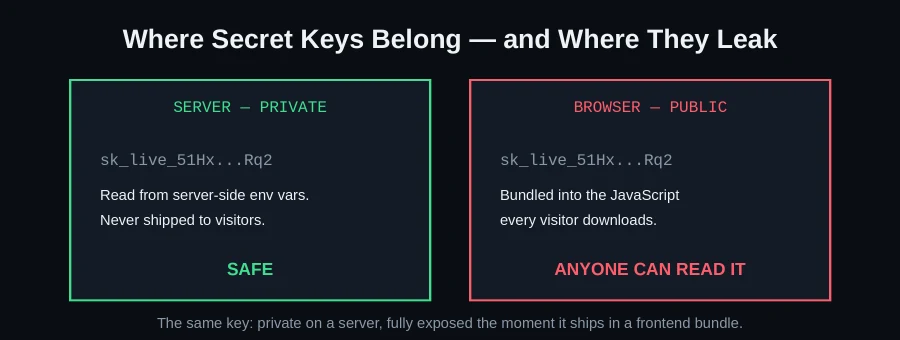
AI coding tools are extremely good at getting a demo working fast, and the fastest way to call an API from a frontend app is to just... call it, with the key inline. In a traditional hand-built app, a developer typically learns early that "anything shipped to the browser is public" and instinctively routes secret-key calls through a backend. AI assistants don't have that instinct by default — they optimize for "does the feature work," and a hardcoded key absolutely makes the feature work in the demo.
The pattern shows up constantly in Lovable and Bolt.new apps that call Stripe or a paid API directly from React components, in v0 projects that put database URLs in client-side environment variables (anything prefixed NEXT_PUBLIC_ in Next.js is shipped to the browser, by design), and in Supabase-backed apps where the anon key is fine to expose but the service-role key is not — and AI tools frequently mix the two up.
How to check your own app in two minutes
1. Open your deployed site and view source
Right-click your live site → "View Page Source," or open DevTools → Sources tab. Search (Ctrl+F) for words like key, secret, sk_live, token, or the name of any service you use (Stripe, Supabase, OpenAI, etc.).
2. Check your bundled JavaScript specifically
Your visible HTML is rarely the leak — your compiled JS bundle is. In DevTools, open the Network tab, reload, and open each .js file your app loads. Search each one the same way.
3. Check your git history, not just your current code
Even if you've since "removed" a key from your code, if it was ever committed to a public GitHub repo, it's still recoverable from git history. If you've ever pushed a key to GitHub, treat it as compromised and rotate it — deleting the file doesn't delete the history.
4. Look specifically for Stripe secret keys and database URLs
A Stripe key starting with sk_live_ in your frontend bundle means anyone can create charges, refunds, or read customer data on your account. A raw Postgres/Supabase connection string with a password in it is equally serious.
If you find a leaked key
- Rotate it immediately — generate a new key in the provider's dashboard and revoke the old one. This is non-negotiable even if you think no one has found it yet.
- Move the call server-side. Any request that needs a secret key should go through a backend endpoint you control, which then calls the third-party API using the key from a server-side environment variable — never a client-side one.
- Check your billing/usage dashboard for the exposed service, looking for unexpected activity in the window the key was live.
- Scrub git history if the key was ever committed — rotating the key matters more than rewriting history, but if the repo is public, consider the exposure permanent and irreversible either way. Rotation is what actually closes the hole.
- Audit anything the key could touch. A leaked Stripe key can mean unauthorized charges or refunds; a leaked database credential can mean read or write access to every row your app manages. Know the blast radius before you assume it's fine.
Why "it hasn't happened yet" isn't reassurance
A common reaction when we point out an exposed key during a scan is "but nothing bad has happened." That's survivorship, not safety. Automated scanners crawl GitHub and public sites continuously looking for exactly this pattern — a Stripe key, a database URL, an AWS credential — and the gap between "exposed" and "found" is usually measured in minutes to hours for anything public, not weeks. If your repo is private and your key has been live for months with no incident, you've likely been lucky, not secure. The fix costs a few minutes. The alternative — waiting to find out the hard way — costs a lot more.
The deeper pattern: why AI tools default to the insecure path
It's worth understanding why this keeps happening even as AI coding tools get better at almost everything else. These models are trained to produce code that satisfies the immediate request — "call the Stripe API to charge the user" — and the shortest path to satisfying that request is a direct client-side call. Routing through a backend, adding an API endpoint, handling the server-side environment variable — that's more files, more moving parts, and a slower path to "it works." Unless a tool is specifically prompted or configured to prefer the secure pattern, it will often reach for the fast one, because from a pure "does the demo work" standpoint, both approaches look identical. This is exactly why a dedicated security scan matters more for AI-generated code than for hand-written code from an experienced backend developer — the failure mode is systematic, not occasional.
Prevention: making this a five-minute habit, not a one-time fix
Once you've cleaned up an existing leak, the real win is not repeating it. A few habits that cost almost nothing:
- Before deploying any new feature that touches a paid API or your database, grep your codebase for the provider's API key prefix (
sk_,AKIA, etc.) and confirm none of them appear outside your server-side config. - Enable secret-scanning on your git host if it's available — GitHub, GitLab, and Bitbucket all offer some form of this, and it catches leaks at commit time instead of after the fact.
- Treat every "it's just for testing" hardcoded key the same as a production one. Test keys still often reveal account structure, and the habit of hardcoding "just this once" is exactly how production keys end up exposed too.
A worked example: the Supabase anon-key confusion
This specific case deserves a closer look because it trips up even people who've read the general "don't expose secrets" advice. Supabase issues two keys: an anon key, explicitly designed to be public and shipped to the browser, and a service_role key, which bypasses all row-level security and should never leave your server. AI tools frequently generate code that's correct about which key goes where — until a later prompt, refactor, or "just make this work" request swaps them, because both are just strings in an environment variable from the model's perspective, with no inherent signal about which one is dangerous. The only real defense is knowing this distinction yourself and checking for it specifically, rather than assuming the AI got it right because the app works.
What a real exposure incident actually looks like
To make this concrete: an exposed Stripe secret key doesn't require a sophisticated attacker. Automated scanners find it, and from there, someone can create charges against your connected bank account, issue refunds to drain funds, or read your full customer and payment history — all through Stripe's normal API, using your own key. An exposed database credential is often worse: full read access to every user's data, or full write access to modify or delete it. These aren't theoretical worst cases; they're the direct, mechanical consequence of what the key is designed to allow, used by whoever has it — your app has no way to distinguish you from anyone else holding the same string.
How our scan finds this automatically
Manually checking your bundled JavaScript is a fine one-time exercise, but it doesn't scale as your app grows or changes. Our Launch Readiness scanner runs the same class of check gitleaks and custom pattern rules would, automatically, against your actual repository and build output — catching keys committed to git history as well as ones currently live in your bundle, and flagging the severity so you know what to fix first. This is exactly the check that found the exposed database credentials in our Cursor SaaS dashboard rescue before they became an incident instead of after.
This is exactly what our free scan checks first
Exposed secrets are the first thing our Launch Readiness scanner checks, alongside missing input validation, open database rules, and broken auth — the same pattern we found and fixed in a real Cursor-built SaaS dashboard rescue, where database keys were visible to every visitor, and in a Lovable booking app rescue, where a payment secret key had shipped straight to the browser. If you'd rather have someone check this for you than dig through minified JavaScript, send us your project on WhatsApp and we'll run a full scan and tell you exactly what's exposed — free, before you decide whether you want us to fix it.
FAQ
Is it safe to have any API key in my frontend code?
Only keys explicitly designed to be public — like a Stripe publishable key (starts with pk_) or a Supabase anon key with proper row-level security enabled. Anything called a "secret key," "service role key," or that grants write/admin access should never appear in frontend code.
My AI tool put the key in an environment variable — isn't that safe?
Not automatically. In frameworks like Next.js or Vite, environment variables prefixed for client exposure (NEXT_PUBLIC_, VITE_) are bundled into the JavaScript your browser downloads, exactly like a hardcoded string. The prefix is a signal that it will be public, not a way to keep it private.
How fast can a leaked key actually be exploited?
Automated bots scan GitHub and public sites for exposed key patterns continuously — some services report compromised keys being used within minutes of being pushed to a public repository. Assume any exposed key is found immediately, not eventually.
What's the difference between a Supabase anon key and a service role key?
The anon key is meant to be public and relies on row-level security policies to restrict what it can actually access — it's safe to expose only if your RLS policies are properly configured. The service role key bypasses row-level security entirely and should never appear anywhere a browser can read it.
I found a leaked key in an old commit but rotated it months ago — do I need to do anything else?
If it was rotated promptly and you've confirmed no unauthorized activity occurred in the window it was live, an old exposed-but-rotated key in git history is low risk going forward. It's still worth removing from history if the repo is public, mainly so it doesn't create false-positive alarm for anyone auditing the repo later.